What Cryptography Protects
Cryptography is the math that lets computers keep secrets and detect tampering. It underpins almost every security control you use: logging into a website, downloading a file safely, sending a private message, or proving a document was not altered. Three jobs matter most in this class. Confidentiality (only the right people can read the data) comes from encryption. Integrity (the data was not changed) comes from hashing. Authentication (the sender or server really is who it claims) comes from digital signatures and certificates. Encryption and hashing sound similar but do opposite things, and mixing them up is one of the most common beginner mistakes in security.
Encryption vs Hashing: The Core Distinction
Encryption is reversible. You scramble data with a key so it looks like noise, and anyone with the correct key can unscramble it back to the exact original. The whole point is that it runs both directions: encrypt now, decrypt later. Hashing is one-way. A hash function takes any input and produces a fixed-size fingerprint called a digest. You cannot run it backward to recover the input. The same input always produces the same digest, but changing even one bit produces a completely different one. That is why hashes verify integrity: if two digests match, the data matches. A useful test: ask whether you will ever need the original data back. If yes, use encryption. If you only need to check whether two things are the same, or whether something was tampered with, use hashing.
Passwords are hashed, not encrypted
A server never needs to see your actual password again. It only needs to check that the password you type at login matches the one you set. So it stores a hash, not an encrypted copy. If a website can email you your original password, it is storing it reversibly, which is a serious red flag.
Symmetric vs Asymmetric Encryption (AES vs RSA)
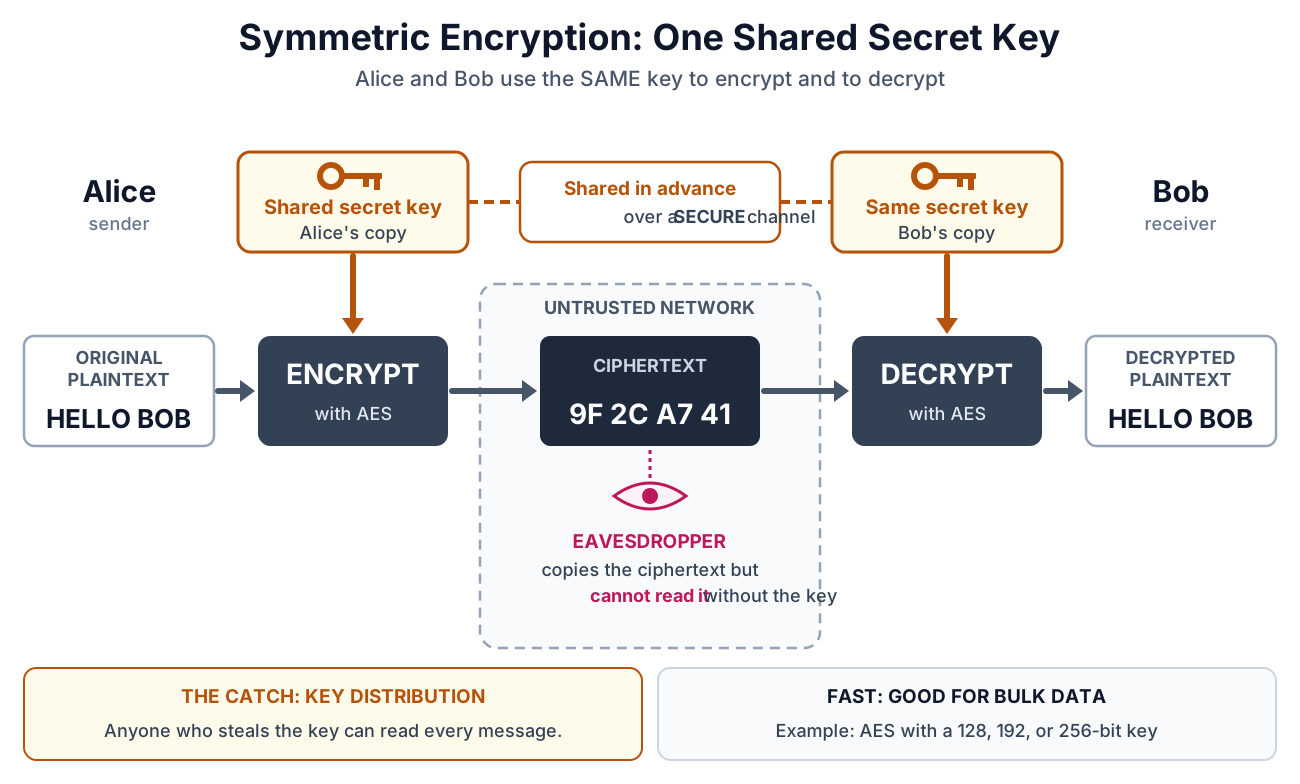
Encryption comes in two families. Symmetric encryption uses one shared secret key for both locking and unlocking. AES (Advanced Encryption Standard) is the modern standard, with 128, 192, or 256-bit keys, and it is very fast, so it handles the bulk of real encrypted data. Its one hard problem is key distribution: how do two parties agree on the same secret key without an eavesdropper capturing it?
Asymmetric encryption solves that. It uses a matched key pair: a public key anyone can hold, and a private key you keep secret. Data locked with the public key can only be opened with the private key, and the reverse (signing with the private key, verifying with the public key) proves identity. RSA is the classic example, using 2048 or 4096-bit keys. Asymmetric math is slow, so it is not used for large files. Instead it does two jobs perfectly: securely exchanging a symmetric key, and creating digital signatures.
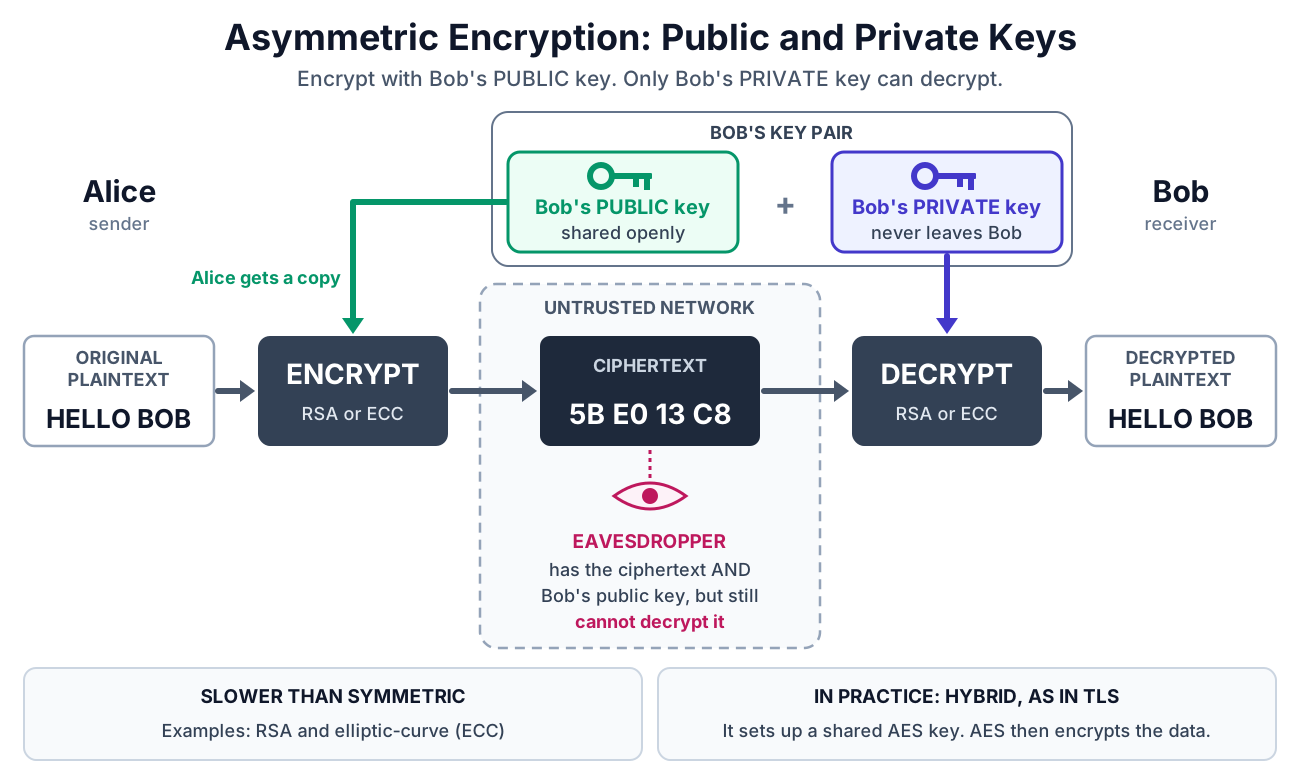
Real systems combine both. Asymmetric crypto sets up the connection and hands off a fresh AES key, then fast symmetric AES encrypts the actual conversation. That hybrid is exactly how HTTPS works.
Hands-on with OpenSSL. Symmetric first (one password), then generating an asymmetric RSA key pair.
| Command | What it does | Example |
|---|---|---|
| openssl enc -aes-256-cbc -pbkdf2 -salt -in F -out F.enc | openssl enc (encode/encipher) - OpenSSL, the Open Secure Sockets Layer toolkit, running its symmetric cipher. -aes-256-cbc picks AES with a 256-bit key in CBC mode, -pbkdf2 stretches your password into that key, -salt adds randomness so identical files still encrypt differently, -in names the input file, and -out names the scrambled output. It prompts for the password that derives the key. | openssl enc -aes-256-cbc -pbkdf2 -in notes.txt -out notes.enc |
| openssl enc -d -aes-256-cbc -pbkdf2 -in F.enc -out F | -d (decrypt) - the same enc subcommand run backward. The -d flag switches it from encrypt to decrypt, -pbkdf2 must match how the file was created, and the password has to be identical or the command fails. | openssl enc -d -aes-256-cbc -pbkdf2 -in notes.enc -out notes.txt |
| openssl enc -aes-256-cbc -pbkdf2 -a -in F -out F.b64 | -a (ASCII armor, base64) - added to the enc subcommand, wraps the encrypted bytes in base64 text so the output is safe to paste into an email or text file instead of staying raw binary. | openssl enc -aes-256-cbc -pbkdf2 -a -in notes.txt -out notes.b64 |
| openssl rand -hex 32 | rand (random) - generate cryptographically secure random bytes. -hex prints them as hexadecimal, and 32 is the number of bytes (256 bits), which is ideal for a key, salt, or token. | openssl rand -hex 32 |
| openssl genrsa -out private.pem 2048 | genrsa (generate RSA key) - create a fresh RSA private key. -out writes it to a file, and the trailing 2048 is the key size in bits (use 4096 for a stronger key). Keep this file secret. | openssl genrsa -out private.pem 4096 |
| openssl rsa -in private.pem -pubout -out public.pem | rsa (RSA key processing) - read an existing key and transform it. -in supplies the private key, -pubout tells OpenSSL to output only the public half, and -out saves that shareable public key. | openssl rsa -in private.pem -pubout -out public.pem |
| openssl rsa -in private.pem -noout -text | -noout -text - inspect a key rather than convert it. -text prints a human-readable breakdown (key size, modulus, exponents) and -noout suppresses re-printing the raw key, so you can confirm a key really is 2048 or 4096 bits. | openssl rsa -in private.pem -noout -text |
Hashing Algorithms in Practice
A cryptographic hash function turns any input, whether a single word or a 5 GB file, into a fixed-length digest. SHA-256 (part of the SHA-2 family) produces a 256-bit digest, usually shown as 64 hexadecimal characters, and is the current default for integrity checks and file verification. Good hash functions have three properties: the same input always gives the same output, it is infeasible to reverse, and it is infeasible to find two different inputs with the same digest (a collision).
MD5 and SHA-1 are broken, do not trust them for security
MD5 (128-bit) and SHA-1 (160-bit) are still everywhere, but researchers can now deliberately build two different files that share the same digest (a collision, publicly demonstrated for SHA-1 in 2017). A matching MD5 or SHA-1 hash therefore no longer proves a file is authentic. Treat them as non-security checksums only, for spotting accidental corruption, and use SHA-256 or stronger for anything a security decision depends on.
Standard Linux hashing tools. The digest is printed first, then the filename (or a dash for input piped in).
| Command | What it does | Example |
|---|---|---|
| sha256sum FILE | sha256sum (SHA-256 checkSUM) - compute the SHA-256 digest of a file. The 256 is the digest size in bits and 'sum' is short for checksum. This is the modern default for integrity checks. | sha256sum ubuntu-24.04.iso |
| echo -n "text" | sha256sum | echo (a plain English word) with -n (no trailing newline) - print the text without the newline echo normally appends, since that newline would change the digest, then pipe it into sha256sum to hash a string instead of a file. | echo -n "hello" | sha256sum |
| sha256sum FILE... > checksums.sha256 | > (redirect) - write the digests of one or more files into a checklist file. This is how you build the expected-digest list that sha256sum -c verifies later. | sha256sum *.iso > checksums.sha256 |
| sha256sum -c FILE.sha256 | -c (check) - read a saved list of expected digests and verify each file against it, printing OK or FAILED per line. Add --quiet to show only the failures. | sha256sum -c checksums.sha256 |
| md5sum FILE | md5sum (MD5 checkSUM) - compute an MD5 digest, which is 128 bits. Broken for security because attackers can forge collisions, so use it only for spotting accidental corruption. | md5sum backup.tar |
| sha1sum FILE | sha1sum (SHA-1 checkSUM) - compute a SHA-1 digest, which is 160 bits. Also broken, with collisions demonstrated in 2017, so never rely on it for signatures or security decisions. | sha1sum backup.tar |
| openssl dgst -sha256 FILE | openssl dgst (digest) - OpenSSL's hashing subcommand. -sha256 selects the algorithm, and you can swap it freely, for example -sha512 for a longer digest. | openssl dgst -sha512 report.pdf |
Salting Passwords
If two users pick the same password, a plain hash stores the identical digest for both, and attackers precompute huge tables of common-password hashes (rainbow tables) to reverse them instantly. A salt defeats this. A salt is a unique random value generated for each user and combined with the password before hashing. Because every user gets a different salt, identical passwords produce different stored hashes, and precomputed tables become useless. The salt is stored right next to the hash. It does not need to be secret. Its job is uniqueness, not secrecy.
Salting is necessary but not sufficient, use a slow KDF
SHA-256 is fast by design, which is great for file checks but bad for passwords, because an attacker who steals the hash can try billions of guesses per second on a GPU. Real password storage uses a deliberately slow, salted key-derivation function built for the job: bcrypt, scrypt, or Argon2 (Argon2id is the current recommendation). These bake the salt in and let you tune how slow they are. Never store passwords with plain SHA-256 or MD5.
Where HTTPS and TLS Fit
HTTPS is just HTTP running inside TLS (Transport Layer Security), the protocol behind the padlock in your browser. TLS is where everything on this sheet comes together in one handshake. First, asymmetric crypto authenticates the server through its certificate (signed by a trusted Certificate Authority) and securely establishes a shared session key. Then fast symmetric AES encrypts the actual page data using that session key. Throughout, hashing (as a message authentication code) verifies that nothing in transit was altered. So a single secure page load uses all three tools at once: asymmetric for setup and identity, symmetric for speed, and hashing for integrity.
Common ports. The secure versions wrap a plaintext protocol inside TLS.
| Port | What runs there | Protocol |
|---|---|---|
| 443 | HTTP wrapped in TLS. Encrypted, server-authenticated, integrity-checked web traffic. | HTTPS |
| 80 | Plain HTTP with no encryption. Anyone on the network path can read it. | HTTP |
| 22 | Encrypted remote shell and file transfer. Authenticates with asymmetric key pairs. | SSH |
| 993 | IMAP email retrieval secured with TLS. | IMAPS |
| 465 | SMTP email submission secured with TLS. | SMTPS |
What the padlock does and does not mean
The padlock means the connection is encrypted and the site presented a valid certificate for that domain. It does not mean the site is honest or safe. Scammers can obtain free valid certificates too, so a padlock proves the channel is private, not that the other end deserves your trust.
Quick Comparison
The three tools are easy to keep straight once you line up what each one is for. Encryption hides data (and can be undone with a key). Hashing proves data has not changed (and can never be undone).
| Property | Symmetric (AES) | Asymmetric (RSA) | Hashing (SHA-256) |
|---|---|---|---|
| Keys used | One shared secret key | Public + private key pair | None (keyless, one-way) |
| Reversible? | Yes, with the key | Yes, with the private key | No, never |
| Speed | Very fast | Slow | Very fast |
| Typical use | Bulk data encryption | Key exchange and digital signatures | Integrity checks and password storage |
| Typical size | 128 / 192 / 256-bit key | 2048 / 4096-bit key | 256-bit digest |
| Main limitation | Sharing the key safely | Too slow for large data | Cannot recover the input |
Try it yourself
1. Hash your first name with echo -n "yourname" | sha256sum, then capitalize one letter and hash it again. Confirm the two 64-character digests have nothing in common. That is the avalanche effect.
2. Download any Linux ISO, run sha256sum on it, and compare your result against the checksum published on the project's download page. Ask yourself: what would a mismatch tell you about the file you downloaded?
3. On paper, trace one HTTPS page load and label each step with the tool it uses: which part relies on RSA (asymmetric), which on AES (symmetric), and which on SHA-256 (hashing), and what job each one does (identity, secrecy, or integrity).
case-note-1.txtDownload case-note-1.txt: https://restedteacher.com/practice-files/cybersecurity/case-note-1.txt
One of four short incident case notes used with checksums.txt below to practice verifying file integrity.
case-note-2.txtDownload case-note-2.txt: https://restedteacher.com/practice-files/cybersecurity/case-note-2.txt
One of four short incident case notes used with checksums.txt below to practice verifying file integrity.
case-note-3.txtDownload case-note-3.txt: https://restedteacher.com/practice-files/cybersecurity/case-note-3.txt
One of four short incident case notes used with checksums.txt below to practice verifying file integrity.
case-note-4.txtDownload case-note-4.txt: https://restedteacher.com/practice-files/cybersecurity/case-note-4.txt
One of four short incident case notes used with checksums.txt below to practice verifying file integrity.
checksums.txtDownload checksums.txt: https://restedteacher.com/practice-files/cybersecurity/checksums.txt
The published SHA-256 digest for each of the four case-note files, in the same format sha256sum -c expects.
Get all five files into one folder
Move all five downloads into a labs folder and go there, using commands from the [Terminal Basics](/reference/cybersecurity/terminal-basics) sheet:
mkdir -p ~/labs/hashing && mv ~/Downloads/case-note-*.txt ~/Downloads/checksums.txt ~/labs/hashing/ && cd ~/labs/hashing
Then run ls and confirm all five files are there before you start hashing.
Using the four case-note files and checksums.txt, answer using real commands (sha256sum, sha256sum -c):
1. Run sha256sum -c checksums.txt. What word does it print after each filename when a file's hash matches the digest recorded in checksums.txt?
2. Run sha256sum case-note-3.txt by itself. What are the first 8 hex characters of its digest?
3. Open case-note-1.txt, change the word "Recommend" to "recommend" (lowercase the R), save it, and run sha256sum -c checksums.txt again. What word does it print for case-note-1.txt now, and why did a one-letter change matter?